 Clipboard History
Keeps the text you copy, so you can find it and use it again. Search, pin, and paste from a quick picker.
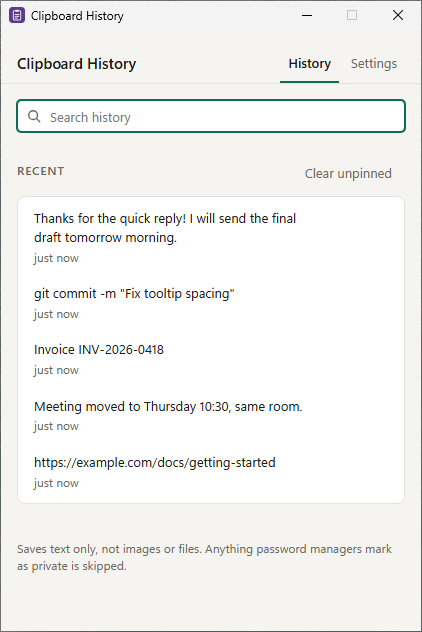
What it does
Small and quiet, it lives in the tray. Click the icon and it opens next to the clock; click away and it hides.
Searchable history
The last 200 things you copied, or 50 or 500 if you prefer. Type to filter, click to copy again.
Pin what you reuse
Pinned items don't count toward the limit and are never removed to make room.
Quick picker, opt-in
Turn on Ctrl+Shift+V to open a small picker wherever you're typing. Off by default, because many apps use that shortcut.
Private stays private
Text only, no images or files. Anything password managers mark as private is skipped.
Your call on keeping it
History is saved on this PC and kept after a restart. Turn that off and it's forgotten when you quit, or pause recording any time.
Privacy in short
- On your PC
- The text you copied (up to your history size), pinned items and your settings. Stored in your Windows user profile and never uploaded by Clipboard History.
- Bandwidth sharing
- EarnFM processes your IP address, a device ID and your consent record to run the sharing, based on your consent.
- Usage statistics
- Clipboard History sends usage statistics to PostHog (EU): a random install ID, app and Windows version, sharing and settings status, feature use counts, crash summaries and, once you've agreed, recordings of how its window is used with your content hidden. Never your clipboard, snippets, what you type or window titles. No account, no ads.
- This website
- PostHog analytics and page recordings without cookies, to see which pages and campaigns lead to downloads and how the pages are used. It's served by Cloudflare, which handles your IP address to deliver the pages.
Questions
What do I need to run it?
Windows 10 or Windows 11, 64-bit. It installs for your Windows account only, so you don't need administrator rights. Clipboard History uses Microsoft Edge WebView2, which is part of Windows 11 and most Windows 10 PCs; if it's missing, the installer fetches it.
Windows says it protected my PC. Is the download safe?
New downloads build trust with Microsoft's SmartScreen over time, so Windows may show "Windows protected your PC" for a while. The installer is signed by TeraShift GmbH. Check that the publisher shown is TeraShift GmbH, then choose More info and Run anyway.
Is it really free?
Yes. Every feature is included, with no ads, trials or purchases. Clipboard History is paid for by sharing a little unused bandwidth, which you agree to when you first open it. How that works.
Can I use it without sharing bandwidth?
No. Sharing is what keeps Clipboard History free, so the app asks first and only runs if you agree. If you choose "No thanks, quit", nothing is shared and the app closes.
Will it slow down my internet?
It's built to use only bandwidth you aren't using, and it stops while Clipboard History isn't running. If you notice a difference you're unhappy with, uninstalling stops it completely.
How do I stop sharing or uninstall?
Uninstall Clipboard History: open Windows Settings, then Apps, then Installed apps, find Clipboard History and choose Uninstall. Sharing stops as soon as it's uninstalled. In the app, Settings, then Stop sharing, takes you to the same place. Step-by-step instructions.
What data does it collect?
The app's own data (the text you copied (up to your history size), pinned items and your settings) stays on your PC. For bandwidth sharing, EarnFM processes your IP address, a device ID and a record of your consent. Clipboard History also sends usage statistics to PostHog, our analytics service in the EU: a random install ID, the app and Windows version, whether sharing and Start with Windows are on, which settings are switched on and how often features are used. Once you've agreed, it also records how its window is used, with your own content (clipboard items, snippets, app names, places) and input fields hidden. It never sends what you copy, type or store, or window titles. Details are in the privacy policy.
Does it start with Windows?
Yes, quietly in the tray, so it's there when you need it. You can turn that off in Clipboard History's Settings. Anything that would interrupt you, like notifications or shortcuts, is off until you turn it on.
Does it save passwords I copy?
Not from password managers and other apps that mark copied content as private: those copies are skipped. If you copy a password from a normal app it's saved like any other text, on your PC only, and you can delete it or clear the whole history.
Get Clipboard History
Free for Windows 10 and 11. By installing and agreeing in the app, you accept the terms of use.